---
title: Clone an audience definition
description: You can now clone an existing audience definition directly from the report list, streamlining the creation of new reports with similar criteria.
---
[Skip to content](https://help.audiense.com/linkedin/how-to-clone-an-audience-definition#main-content)
English
Show submenu for translations

Open main navigation
Close main navigation
- English
Show submenu for translations
- [Contact us](https://help.audiense.com/linkedin/contact-support)
[Contact us](https://help.audiense.com/linkedin/contact-support?hsLang=en)
Digital Intelligence by Audiense knowledge base
- There are no suggestions because the search field is empty.
1. [Linkedin Knowledge Base](https://help.audiense.com/linkedin?hsLang=en)
2. [Useful Features](https://help.audiense.com/linkedin/useful-features?hsLang=en)
# Clone an audience definition
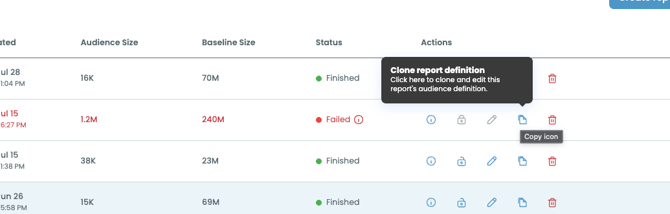
#### A new action is now available in the Report List: the ability to clone an audience definition. This works in the same way as the cloning option in Audiense Insights, letting you quickly recreate a report setup without starting from scratch.
#### **How to Clone an Audience Definition**
1. **Go to the Report List:** Access your list of reports from the main navigation.
2. **Locate the report you want to clone:** Find it in the list
3. **Select “Clone report definition”:** This will open the **Audience Manager** with all the original filters and attributes pre-filled.
4. **Choose your next step**:
**- Launch the report as is** to recreate the same setup.
**- Edit the attributes** to adjust filters, channels, or other parameters, then launch.
Cloning an audience definition allows you to:
- **Save time** by reusing existing filters and configurations.
- **Maintain consistency** when creating similar reports.
- **Test variations** in audience definitions without affecting the original report.
Cloning does **not** modify the original report. It creates a new one based on its setup. This feature is ideal for creating similar reports for different geographies, campaigns, or segments.
- [Getting started](https://help.audiense.com/linkedin/getting-started?hsLang=en)
- [Report creation](https://help.audiense.com/linkedin/report-creation?hsLang=en)
- [Report Results](https://help.audiense.com/linkedin/report-results?hsLang=en)
- [Useful Features](https://help.audiense.com/linkedin/useful-features?hsLang=en)
- [Use Cases](https://help.audiense.com/linkedin/use-cases?hsLang=en)
- [FAQs](https://help.audiense.com/linkedin/faqs?hsLang=en)
[](https://audiense.com)
[mailto:email@email.com](mailto:email@email.com)
Copyright © 2025, Audiense